Your 8:00 daily digest did not show up and you want to know why. This article explains exactly when a scheduled task runs, what happens after your laptop wakes up, and where to check what ran.
Scheduled tasks only run while the app is open
Booked Solid OS has no background service. If the app is closed at the scheduled time, the task simply does not run. It will run the next day the app is open at or after its scheduled time. Nothing piles up: a task runs at most once per day.
While the app is open, a check runs every 30 seconds. A task fires when two things are true: the clock has reached its time on a matching day, and it has not already run today.
Waking from sleep: the task still runs
Because the timer checks "has the time been reached" rather than "is it exactly this time," a short sleep does not cost you the run. If your laptop was asleep at 9:00 and wakes at 9:07, the next check sees that 9:00 has passed and the task has not run today, so it runs right then.
The same logic covers opening the app late. Open the app at 2 pm and your 8:00 task runs shortly after launch, because 8:00 has been reached and the task has not run yet that day.
A few more timing rules
- One job at a time. If Otto is already working when a task comes due, the task is never forced in. It just waits and starts on a later check.
- Failed runs back off. If a task fails, it retries with growing gaps (5 minutes, then 10, then 20) and stops after 3 attempts that day.
- Sign in first. Every task except Back up my data needs you signed in. If you are not, the task will not start and its note says Sign in first.
See what ran and what is queued
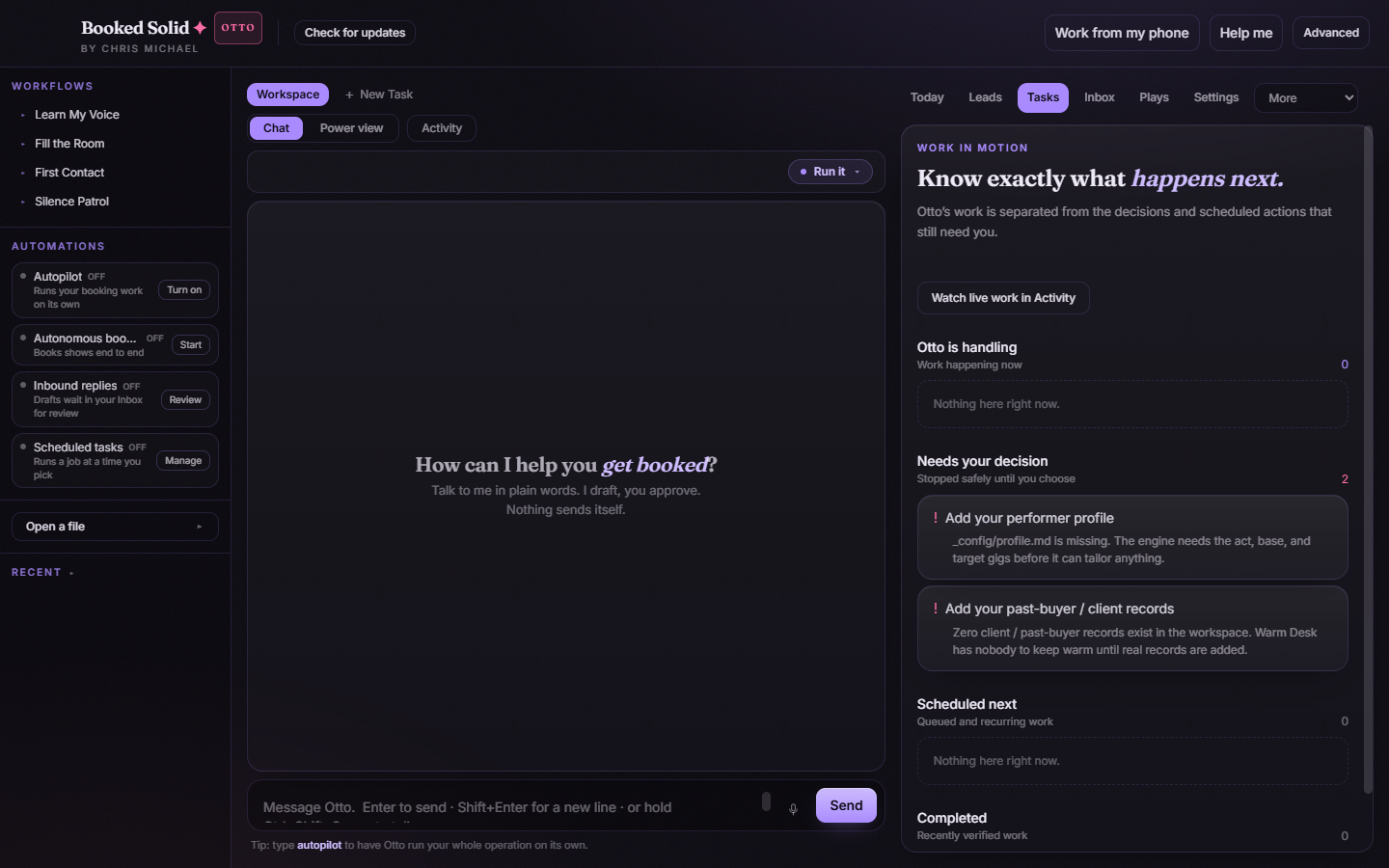
Open the Tasks tab. It splits Otto's work into four lists:
- Otto is handling - work happening right now
- Needs your decision - items stopped safely until you choose
- Scheduled next - queued and recurring work, including your scheduled tasks
- Completed - recently verified work
Good to know: if the app closed mid-run
If the app closed while a job was running, what happens next depends on whether that job could have sent anything. A job that only reads and drafts is re-queued and continues. A job that may have contacted someone is marked failed on purpose, with the note that the app closed before the result was verified. It is never replayed automatically, so nobody gets emailed twice. Review what actually went out, then run the play again yourself.
Still stuck? Email bookedsolid@kivimedia.freshdesk.com and a person will help.
Was this article helpful?
That’s Great!
Thank you for your feedback
Sorry! We couldn't be helpful
Thank you for your feedback
Feedback sent
We appreciate your effort and will try to fix the article