Good news: the app took over your old routine
If you ran Booked Solid from the terminal, everything you used to type now has a home in the desktop app, and most of it happens without you typing anything at all. Here is the translation guide.
Your old commands, translated
morning → the Today briefing
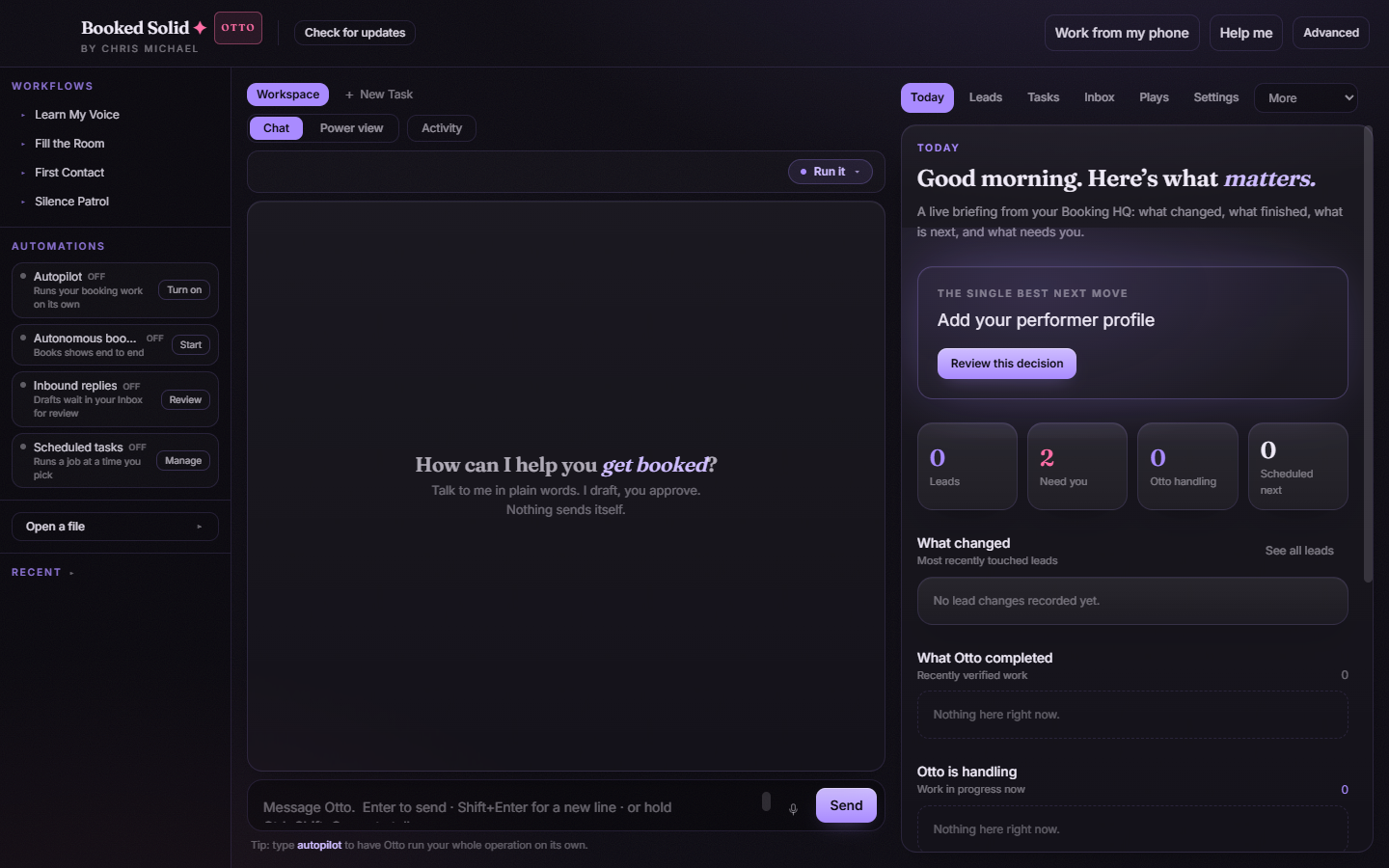
You used to type a command to get your morning rundown. Now the Today tab is the first thing you see when you open the app, and it builds itself: your single best next move, what changed overnight, what Otto completed, what he is handling now, your follow-ups, and anything waiting on your decision. No command needed. Open the app and it is there.
wake → not needed anymore
In the terminal days you nudged things awake after your computer had been asleep. The app handles this on its own: scheduled tasks that missed their set time while your laptop was closed simply run when the machine wakes up. A task set for 8:00 still runs when you open the lid at 9:15. There is nothing to type and nothing to remember.
plays and scripts → the Plays tab
The booking jobs you used to launch by name now live in the Plays tab as one-tap cards: First Contact, Fill the Room, Silence Patrol, Handle the Reply, Build Proposal, Lock It In, and the rest. Tap a play, fill in its simple controls (tone, floor rate, how many), press Run it, and watch it work in Activity. Your three most-used money plays also sit in the left sidebar for one-tap launching from anywhere.
The old localhost Booth → the Dashboard
The dashboard you used to open in a browser tab is now the Dashboard panel inside the app (under the More menu): your money in play, pipeline stages, and relationships, read live from your files. It is read-only and never sends anything.
Where your files live now
Same place, same plain files: your Booking HQ folder. The app reads and writes the exact workspace the terminal version used. On first run, the app detects an existing Booking HQ and offers "Pick up where you left off" so you can adopt it in one tap. You can always see or change the folder under Settings > General > Your Booking HQ.
Miss the terminal? It is still in there
Every task tab has a Power view: a real terminal running the Booked Solid command line, with Chat, Board, Plays, and Inbox views you can cycle with Tab. Nothing was dumbed down. The app is a face over the same brain, so both always agree.
One honest note: if an old command you relied on is not listed here, it may not have a one-to-one twin in the app. Ask the Help me button (top bar) what replaced it, or run your old routine from Power view. Either way, the app supersedes the terminal flow, so you will not lose anything by switching over.
Still stuck? Submit a ticket from this help center and we'll take it from there.
Was this article helpful?
That’s Great!
Thank you for your feedback
Sorry! We couldn't be helpful
Thank you for your feedback
Feedback sent
We appreciate your effort and will try to fix the article