The first time you open Booked Solid, a one-time full-screen opening walks you through two things: where your work will live (your Booking HQ) and a quick first job, so you can see Otto work before you invest any real time. The whole thing takes a couple of minutes, and you can skip any part of it.
One thing Otto needs first: a Claude account
Otto runs on Claude, so the very first launch includes a short one-time step called Get Otto ready. You sign in to your Claude account in the browser and you are done - no keys, no technical setup. A paid Claude plan is required for Otto to work: Claude Pro, about $20 a month, covers most performers; if you run Autopilot hard every day, you may need Claude Max, about $100 a month. The free tier does not work. Once you are signed in, the opening below continues as described.
Choose your door
The opening starts by offering a few paths. Pick the one that matches you:
- Pick up where you left off - if the app detected a Booking HQ you've used before, one tap adopts it and everything you had is back. If the folder it found isn't yours, click This isn't my Booking HQ and choose differently.
- Let's get your first one - the new performer path. This is the full guided run: permissions, your act, and your first win.
- I've already started using Booked Solid - the bring-over door for work sitting on another computer or in your Claude chats. See the article "Bring your work over from another computer or your Claude chats" for that path.
- Look around first - skips the rest of the opening and drops you straight into the app.
Grant system permissions
Next comes a short permissions beat. Each permission has its own row with an Allow or Open Settings button, and granted ones show a checkmark. These power things like voice input and computer control later on. Grant what you're comfortable with, then click Continue - or Skip for now and handle it later from Settings.
Get your first win
- Describe your act in one line - who you perform for and what you do.
- Click Show me my first win.
- Otto runs a quick first-win job. It's draft-only and uses a fast model, so nothing is sent anywhere and it finishes quickly. You can watch it stream step by step on the Activity screen.
Not in the mood right now? Click Skip, I'll set it up later and run it from inside the app whenever you like.
Where you land
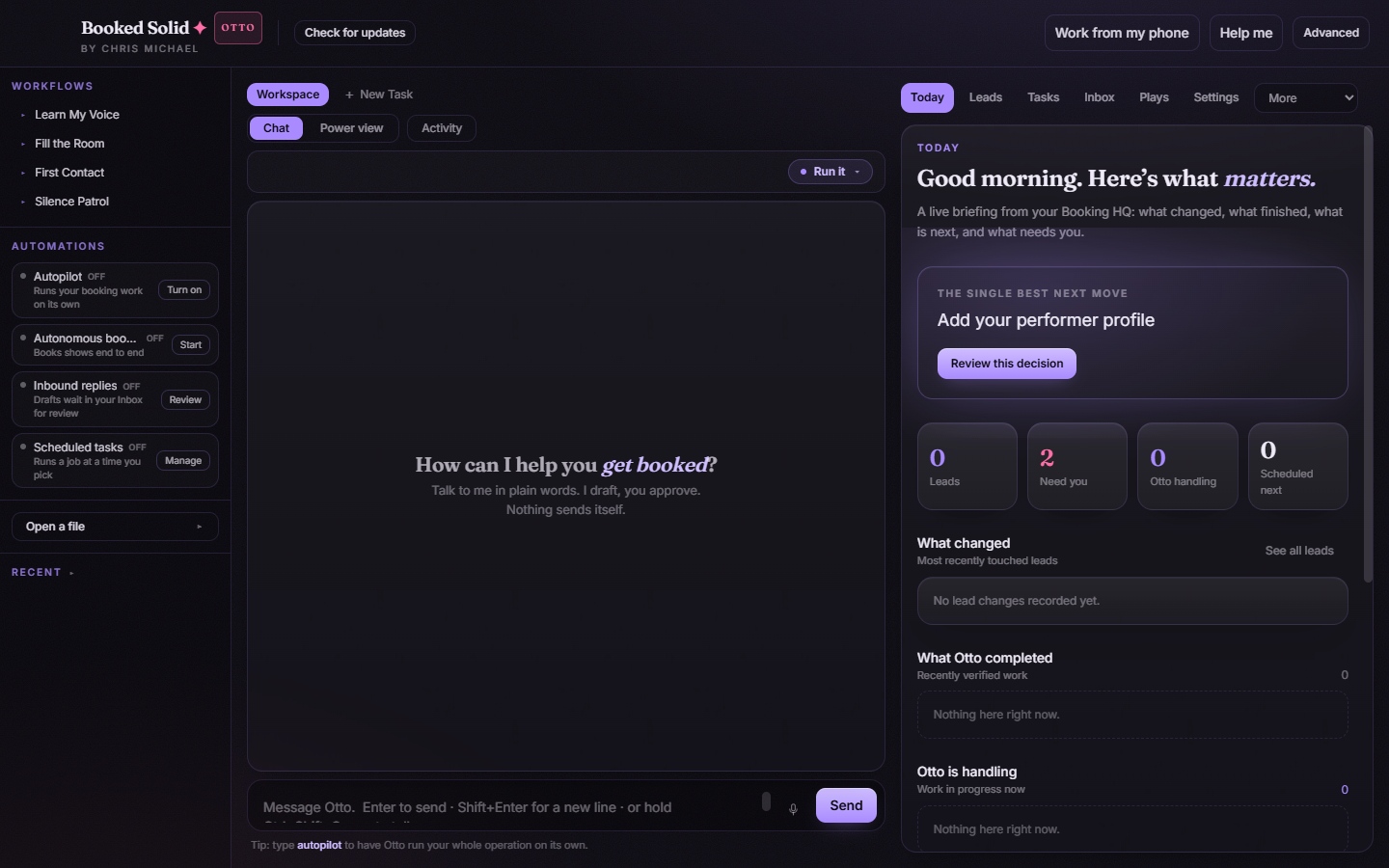
When the opening finishes, you're in the main workspace: chat with Otto in the middle, quick workflows and automations on the left, and your Today briefing on the right with the single best next move waiting for you.
Want to see the opening again?
Go to Settings > General and click Replay the opening. It runs the same full-screen welcome any time you want a refresher or need to redo a step.
Still stuck? Submit a ticket from this help center and we'll take it from there.
Was this article helpful?
That’s Great!
Thank you for your feedback
Sorry! We couldn't be helpful
Thank you for your feedback
Feedback sent
We appreciate your effort and will try to fix the article