The left sidebar is your launch pad. It is always visible, and it packs four things into one rail: one-tap workflow buttons, your standing automations with their live on/off state, a file finder, and your recent conversations.
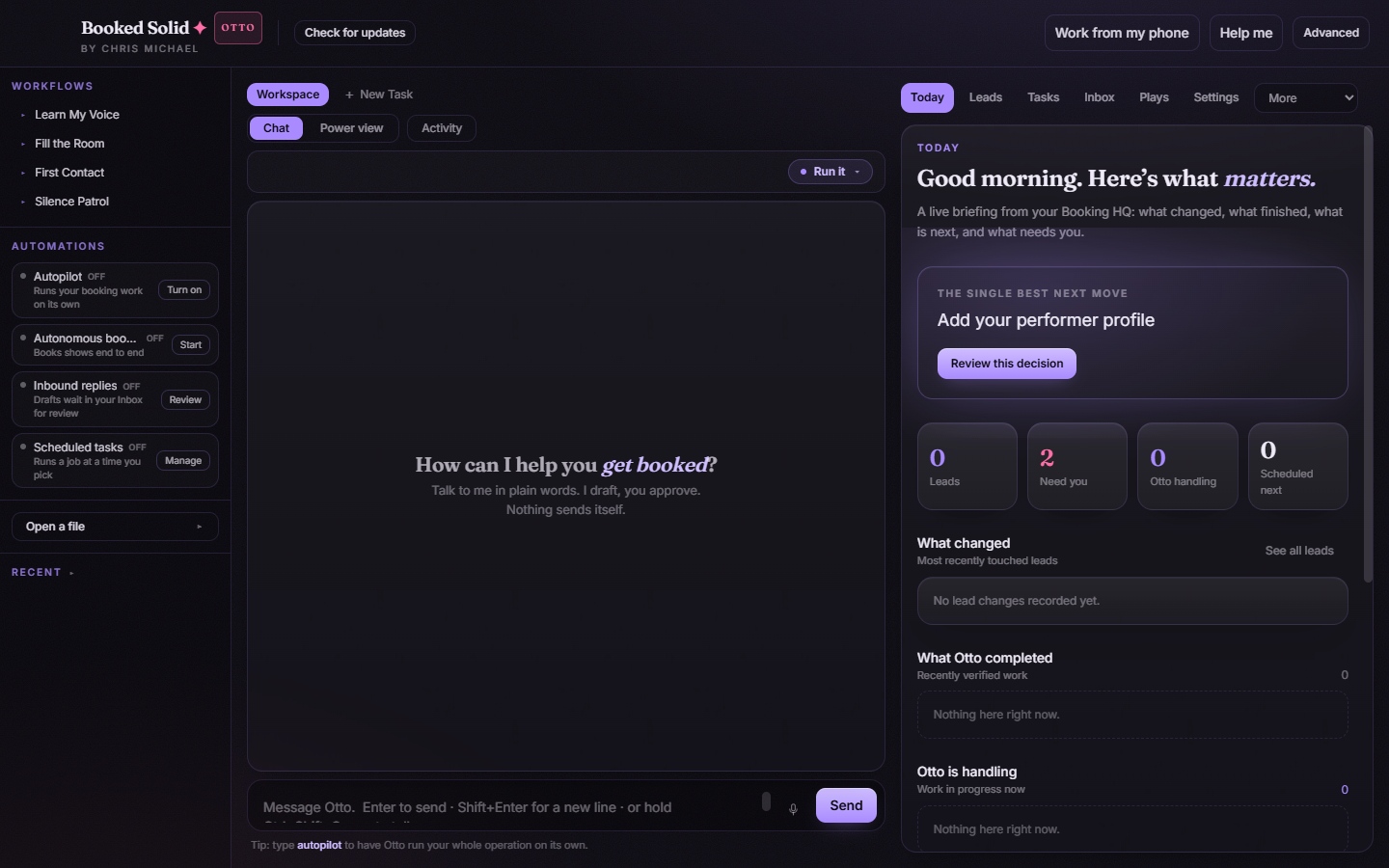
Workflows: one tap to a money play
The Workflows section shows Learn My Voice plus your top three money plays (for example Fill the Room, First Contact, and Silence Patrol). Clicking one quick-launches it: the app opens the Plays tab and runs that play, so a workflow you use daily is never more than one click away.
Automations: your standing work, with live status
Each row shows what it does and whether it is currently on:
- Autopilot: Turn on / Turn off. Turning it on walks through the Autopilot flow (it is an Otto-tier feature and asks about EPIN membership before the task chooser).
- Autonomous booking: Start / Stop for Fully Autonomous Booking, with a confirm step before anything starts.
- Inbound replies: Review opens the Inbox, where drafted replies wait for your eyes.
- Scheduled tasks: Manage opens Settings, and the row shows a live count of how many scheduled tasks you have.
Open a file: by name or by description
Expand Open a file and you get a small finder that saves you from digging through folders:
- Type a filename or path into the field.
- If you only remember roughly what the file is, flip on Find with AI and describe it in your own words instead.
- Optionally flip on Open file location if you want the folder rather than the file itself.
- Press the button. Its label follows your toggles: Open, Find it and open, or Reveal in Finder.
Recent: reopen any past conversation
The Recent expander lists your past conversations. A few useful moves:
- Click a row to reopen that conversation in a new Chat tab and pick up where you left off.
- Refresh reloads the list, and the search field filters it by name as you type.
- Right-click a row and choose Rename to give a conversation a name you will recognize later. Type the new name inline, press Enter to commit, or Esc to cancel.
Between the Workflows buttons at the top and Recent at the bottom, the sidebar is the fastest way to start work and the fastest way to get back to work you already started.
Still stuck? Submit a ticket from this help center and we'll take it from there.
Was this article helpful?
That’s Great!
Thank you for your feedback
Sorry! We couldn't be helpful
Thank you for your feedback
Feedback sent
We appreciate your effort and will try to fix the article